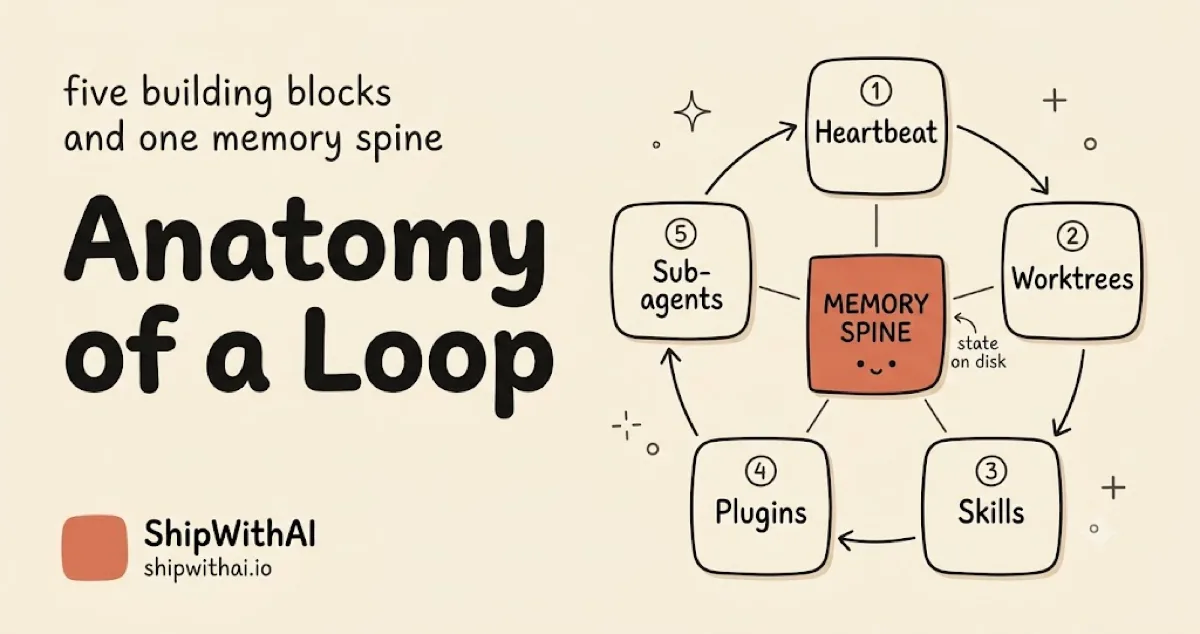
Anatomy of a Loop: Five Building Blocks and One Spine
TL;DR
- A loop is five things you already use plus one you probably skip: scheduled automation, worktrees, skills, plugins/connectors, and sub-agents, assembled around an external memory spine that survives between runs.
- Each block maps to a concrete Claude Code primitive:
/loopand Routines,isolation: worktree,SKILL.md, plugins/MCP, and.claude/agents/, wired around one state file.- You build a minimal lint-sweeper loop (one scheduled prompt, one state file, one verifier check) and read its trace block by block. The run below is real.
📊 Result proof. The lint sweeper in this tutorial ran for real on this plugin repo. The verifier started at 3 findings and reached 0 in 2 fix iterations, stopping on the clean exit code (the cap of 5 was never reached), total wall-clock 124 seconds. Numbers and output below come from that run.
You read Part 1 and bought the premise: the leverage moved from prompts to loops. Now you want the parts list. The good news for anyone doing Claude Code automation is that a loop is not a new primitive to learn. It is five loop building blocks you already use, assembled around one piece most people skip. This Claude Code loop tutorial names the five blocks, maps each to a primitive in your harness, and walks you through one minimal loop that actually runs.
Prerequisites: a working harness (CLAUDE.md, at least one skill, a hook or two), Claude Code v2.1.139+ for /goal, and a repo with a lint command that exits non-zero today.
The map: five building blocks and one memory spine
Every working loop decomposes into the same five blocks plus a spine. Name them once and loops stop being magic. The decomposition is Addy Osmani’s, from his “Loop Engineering” synthesis, and it holds up across tools.
A loop is a recursive goal: you define a purpose and a verifiable stop condition, and the system iterates agents against it until the condition holds — without you prompting each turn.
Here is the map. Five blocks in a ring, one spine in the middle:
1. Scheduled automation (heartbeat)2. Worktrees 3. Skills \ / [ MEMORY SPINE ] <- state on disk, survives runs / \5. Sub-agents 4. Plugins / connectorsThe spine is the piece most readers skip, and it is why their “loops” are really one-shot scripts. The blocks do the work; the spine is the only reason the next run knows what the last run did.
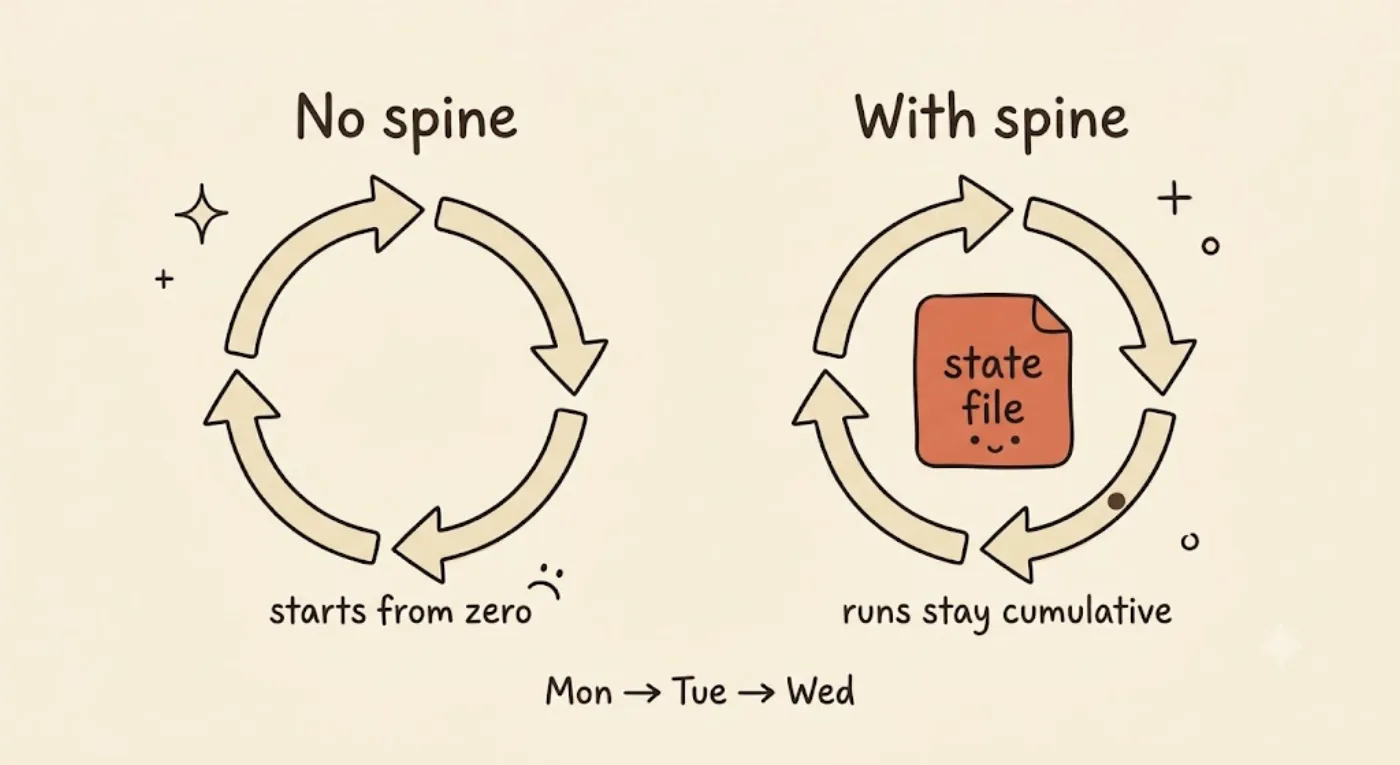
Same five blocks, one difference: the loop on the left has no memory spine, so every run starts from zero — automation that forgets every morning. The loop on the right keeps a state file on disk, so each run knows what the last one did and the work becomes cumulative.
Block by block: which Claude Code primitive is each one?
You already own all five. The useful question is not what each primitive is, but which block it plays. Here is the binding:
| Block | Claude Code primitive | You already use it for |
|---|---|---|
| 1. Heartbeat | /loop [interval]; Routines for cloud cron | re-running a check on a cadence |
| 2. Worktrees | isolation: worktree in agent frontmatter | parallel work without file collisions |
| 3. Skills | SKILL.md | externalizing project intent |
| 4. Plugins / connectors | plugins and MCP servers | reaching real tools (GitHub, CI) |
| 5. Sub-agents | files in .claude/agents/ | the maker/checker split |
A few notes that matter for a senior reader. The heartbeat has two forms: /loop re-runs a prompt on an interval while your session is open, and Routines run cloud-scheduled on cron with the laptop closed (with a per-account daily cap on how many runs can start). Skills are externalized intent; if you want the primitive-level explanation, see components and skills, not this post. Plugins and connectors are the loop’s reach into real tools, covered in installing a plugin. The heartbeat’s event-driven cousin (hooks) has its own reference in the hooks guide; this tutorial keeps hooks to one line.
The spine shows up in the wild as a small file on disk. snarktank/ralph (14.3k stars) keeps its memory in git plus a progress.txt and a prd.json, and stops when every PRD story reads passes: true. The inner agent loop underneath all of this is just while stop_reason == tool_use, as the learn-claude-code walkthrough puts it. Small, greppable, on disk.
How do you build an agent loop in Claude Code? (the minimal lint sweeper)
Build the smallest loop that is still a loop: a lint sweeper. One scheduled prompt runs a linter, writes findings to a state file, and stops when lint is clean. The spec uses the standard kickoff template (from the loops.elorm.xyz card format), which fits the /goal contract:
# lint-sweeper.loopgoal: "flake8 --extend-ignore=E501 scripts/*.py exits 0"max_iterations: 5between_iterations_check: "flake8 --extend-ignore=E501 scripts/*.py"exit_when: "check exits 0 OR iteration == max_iterations"one_step: "fix one batch of findings (batch = one file), then re-run the check"self_pace: "stop as soon as exit_when holds; do not keep going"state_file: "drafts/lint-sweeper-state.md"Try It Now. Paste-and-run the three steps below on a repo with a failing lint command. Each step ends in a
Verify:line so you know it worked.
Step 1: pick a real verifier. The check is the stop signal, so it must be machine-checkable. I ran this on the Python scripts in this content-agent plugin repo, because shipwithai.io has no lint command. That substitution is the honest part: flake8 reported 41 findings, but 38 were E501 (line-too-long), which is noisy and subjective. So the verifier is scoped to the real structural defects: flake8 --extend-ignore=E501 scripts/*.py. The scope is the verifier’s contract, written into the goal, not hidden.
Verify: run it once and confirm it exits non-zero. It did, with 3 findings.
Step 2: write the state file (the spine). A small greppable markdown file with three sections:
goal: flake8 --extend-ignore=E501 scripts/*.py exits 0cap: 5 iterationsiteration: 0## open- gen-agent-map.py:19 F401 'os' imported but unused- gen-dist-metadata.py:23 E301 expected 1 blank line- gen-dist-metadata.py:27 E301 expected 1 blank line## fixed## skippedVerify: every finding from Step 1 sits under ## open before the first fix.
Step 3: wire the heartbeat and run. For the in-session demo the heartbeat is /loop, which re-runs the one-step until the verifier passes. The one-step fixes one batch (one file), updates the state file, and re-runs the check. That is the whole loop. The Result Proof box above is its outcome.
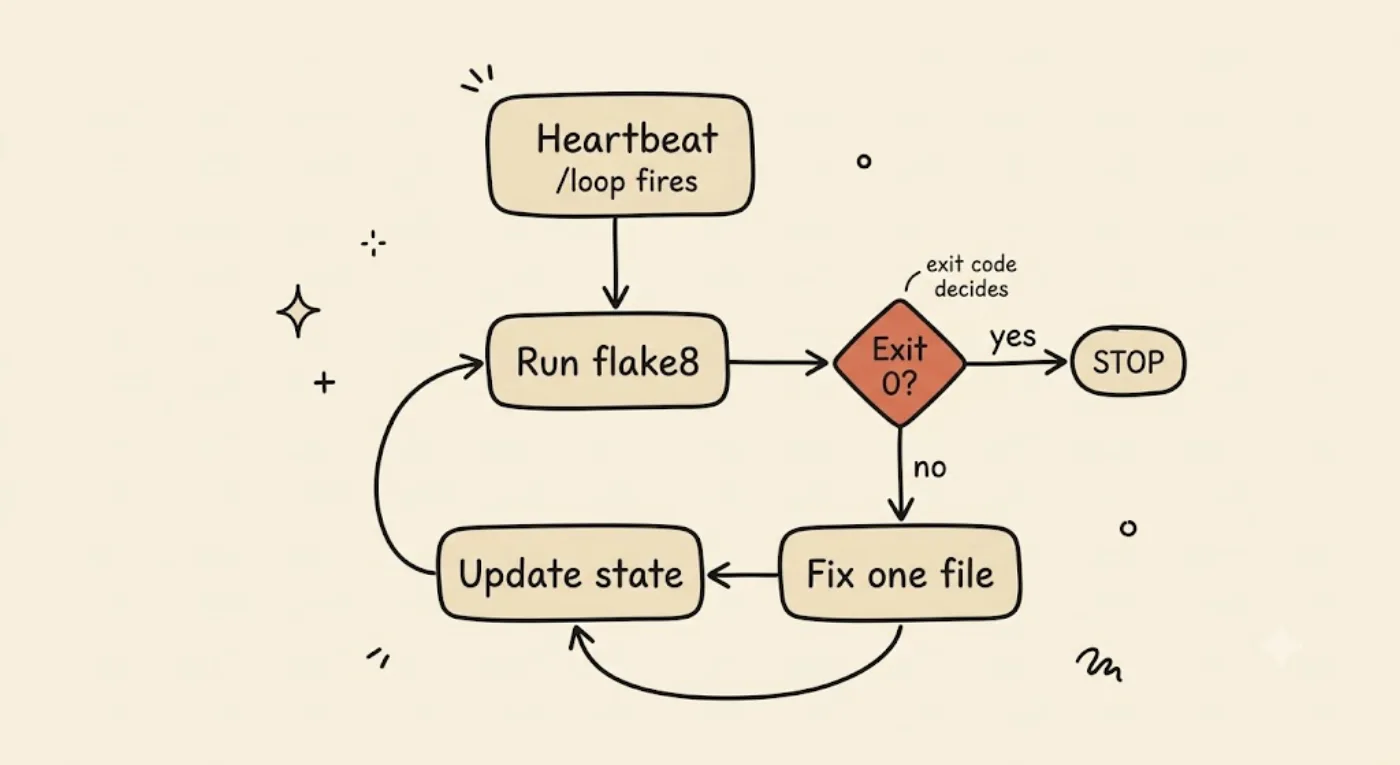
The whole minimal loop on one page: a heartbeat (/loop) fires the check, flake8 runs, and its exit code is the gate — non-zero fixes one file, updates the state file, and re-runs; zero stops. The verifier’s exit code ends the run, not the model’s confidence.
Reading the trace: what did each block contribute in one run?
The loop converged in 2 fix iterations and stopped on the clean exit code, never reaching the cap of 5. Here is the real trace, then the attribution.
# baseline (heartbeat fires, before any fix)$ flake8 --extend-ignore=E501 scripts/*.pyscripts/gen-agent-map.py:19:1: F401 'os' imported but unusedscripts/gen-dist-metadata.py:23:5: E301 expected 1 blank line, found 0scripts/gen-dist-metadata.py:27:5: E301 expected 1 blank line, found 0# exit 1, 3 findings -> enter loop
# iteration 1: batch = gen-agent-map.py (remove unused import)$ flake8 --extend-ignore=E501 scripts/*.pyscripts/gen-dist-metadata.py:23:5: E301 expected 1 blank line, found 0scripts/gen-dist-metadata.py:27:5: E301 expected 1 blank line, found 0# exit 1, 2 findings -> continue
# iteration 2: batch = gen-dist-metadata.py (add 2 blank lines)$ flake8 --extend-ignore=E501 scripts/*.py# no output, exit 0, 0 findings -> stop condition holds, STOP
The diff the loop produced was tiny: 2 files changed, 2 insertions, 1 deletion.
--- a/scripts/gen-agent-map.py+++ b/scripts/gen-agent-map.py@@ -16,7 +16,6 @@ import argparse-import os import sys--- a/scripts/gen-dist-metadata.py+++ b/scripts/gen-dist-metadata.py@@ -20,10 +20,12 @@ try: import yaml as _yaml+ def _load_yaml(text: str) -> dict:Now attribute each visible effect to a block:
- Heartbeat fired the check 3 times (baseline plus after each fix batch). That cadence is what makes this a loop and not a one-off run.
- Verifier (the checker) gated every iteration on the flake8 exit code. Exit 1 continued the loop; exit 0 stopped it. The loop ended because the condition held, not because a model said so.
- Memory spine recorded each finding moving from
## opento## fixed, tagged with the iteration that closed it. After the run, all 3 carried(iter 1)or(iter 2). That is the fingerprint you grep when a loop misbehaves. - Maker produced the diff above and handed each result to the verifier. It never declared itself done.
Two blocks did not run at all. Worktrees were not used (single agent, single repo, no parallel lanes to isolate). Plugins/connectors were not used (no PR opened, no ticket updated). That is honest, and it is the point of a minimal loop: you do not need every block. On cost, I did not instrument token or dollar usage for this manual in-session run, so I will not quote a number I do not have.
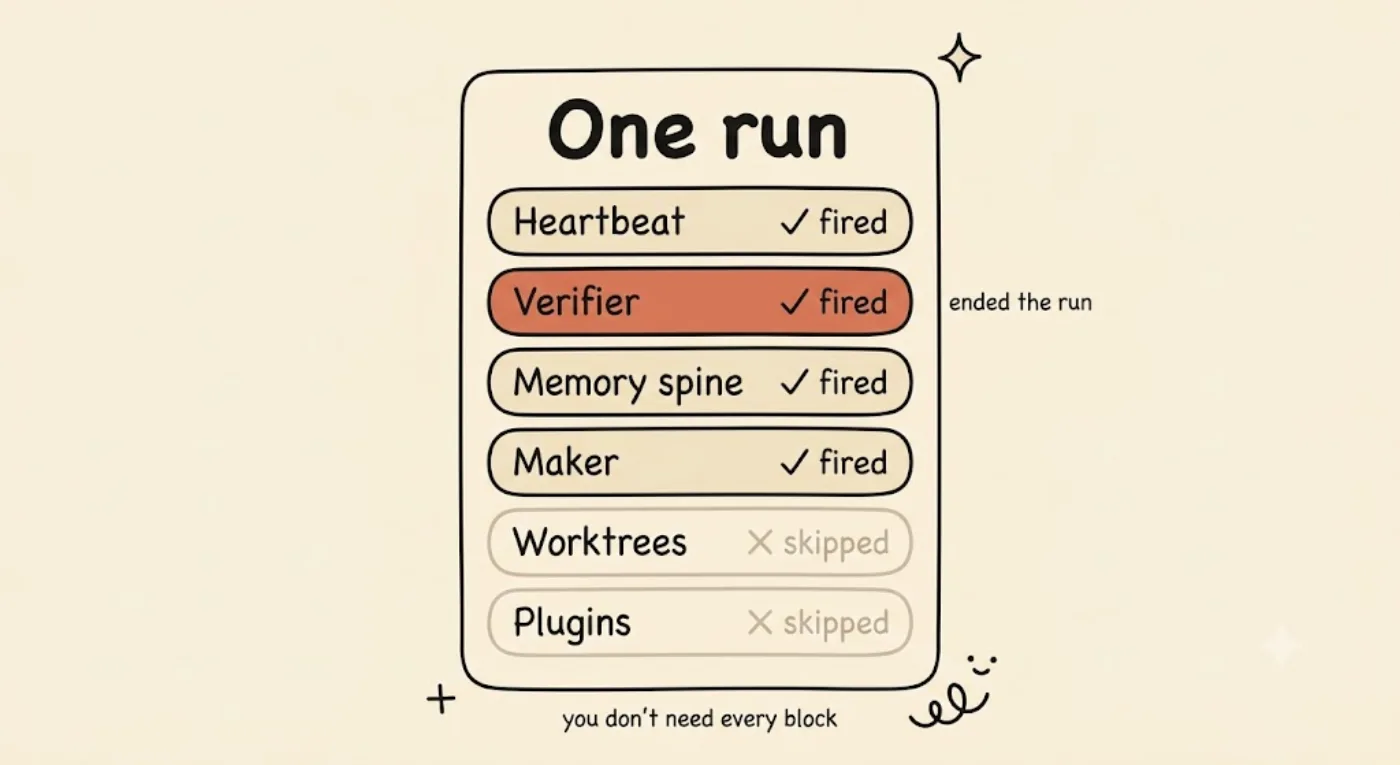
One real run, attributed block by block: the heartbeat, verifier, memory spine, and maker all fired; worktrees and plugins/connectors honestly did not. The highlighted verifier is what ended the run — its exit code, not the model’s confidence. A minimal loop does not need every block.
One more honesty note on the sub-agent block. This run used a single agent with the lint exit code as the checker, which is the minimal maker/checker shape. The full sub-agent maker/checker split, where a separate agent grades the work, is real but it is Part 3 and Part 5 material. I am naming it here, not claiming it ran.
Where each block leaks when it is missing
A loop missing a block does not throw an error. It silently degrades. That distinction (missing versus simply not needed) is the whole back half of this series.
- No verifiable stop condition and the loop declares false victory. Stop conditions get the full treatment in Part 3, including the rungs from a bare check to
/goal(where a separate Haiku model grades the condition each turn, in v2.1.139+) up to the Stop hook with its block override. Named here, taught there. - No memory spine and every run starts from zero, with no resume. That is Part 4.
- No worktrees and no maker/checker and parallel agents collide on the same files. That is Part 5. Our lint sweeper skipped this block because it ran one agent, which is fine.
- No real heartbeat and you have a script you ran once, not a loop. That is Part 6, where Routines and CI turn a manual run into a cadence.
The lint sweeper exercised four pieces and honestly skipped two. Knowing which your job needs is the design work that prompting never asked of you.
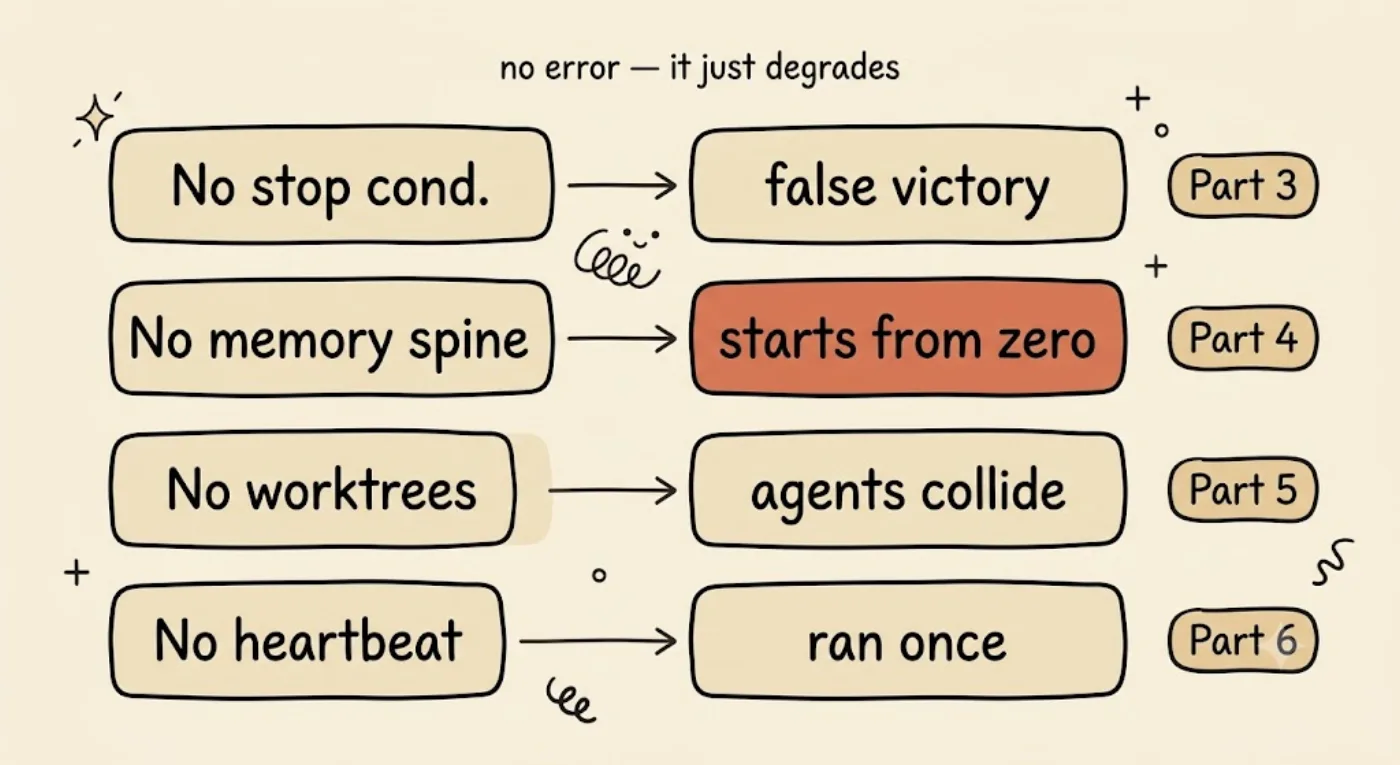
A loop missing a block does not throw an error — it silently degrades, and each failure mode is a later post: no stop condition → false victory (Part 3), no memory spine → every run starts from zero (Part 4), no worktrees/maker-checker → agents collide (Part 5), no real heartbeat → you ran a script once, not a loop (Part 6).
FAQ
What are the building blocks of an agent loop?
A: Five blocks plus a spine: scheduled automation (heartbeat), worktrees, skills, plugins/connectors, and sub-agents, assembled around an external memory file that survives between runs. The framing is Addy Osmani’s.
How do you build a loop in Claude Code?
A: Write a kickoff-template spec (goal, cap, check command, exit condition, one-step, self-pace), add a state file as the spine, and wire a heartbeat (/loop in session, or a Routine for cloud cron). The verifier’s exit code defines “done.”
What is the difference between /loop and Routines?
A: /loop re-runs a prompt on an interval while your session is open. Routines run cloud-scheduled on cron with the laptop closed (per-account daily cap). Same heartbeat block, different reach.
Do I need worktrees for a single-agent loop?
A: No. Worktrees earn their place once more than one agent touches the repo. The lint sweeper here ran fine without one.
What to read next
- Part 3: Stop Conditions: Making “Done” Mean Something (
loop-stop-conditions-verification, ships next in the Loop Engineering series). It turns the verifier block you just named into the discipline of a stop condition a different model can check. - Components and skills, the primitive that block 3 is built from.
- From harness to loops, Part 1, if you skipped the premise this tutorial assumes.


