Scheduled Agent Automation: Give Your Loop a Heartbeat
TL;DR
- A loop earns its name when it runs on a cadence you didn’t trigger. Three heartbeats: in-session
/loop(you’re at the keyboard), cloud Routines (cron, laptop closed), and CI (GitHub Actions). Pick by where the work lives and who needs to be awake.- Decide per beat: event-driven (a hook fires on a lifecycle moment) or time-driven (a schedule fires on the clock). Hooks react; schedules patrol.
- The discipline that makes an unattended loop safe is the triage inbox: discover, route to a human, never auto-merge; nothing found, archive the run cheaply. An empty run must be near-free, or a daily cadence bankrupts you.
📊 Result-Proof: A real scheduled morning-triage run fired the exact triage step a committed GitHub Actions
cronworkflow and a 5-field local cron line would invoke. It read two real work sources (apytestrun with two failures and an open-issues list), wrote every finding to onetried/passed/open/blockedstate file withpassedempty (the loop merged nothing), and opened twogit worktreelanes for the top two findings while leaving the third in the inbox. A second run on a clean morning archived “nothing today” and exited. Mechanism proof, not a live cloud-Routine or cloud-executed Actions transcript; the decision-maker is deterministic ranking, so nothing was instrumented and there are no token figures to report (2026-06-15).
You have a loop that works. A worktree fleet from Part 5, a /loop you kick off, an overnight claude -p runner. But you start every one of them, so it is a run you do, not a loop that runs. The missing piece is scheduled agent automation: a heartbeat that wakes the loop without you, finds work, triages it, and hands you a short list of decisions instead of a blank prompt. The objection writes itself: isn’t this just cron with extra steps? One line, up front, from Matt Van Horn: a loop is cron plus a decision-maker in the body. The cron is the trivial half; the decision-maker is the loop.
This tutorial gives you four things: the three heartbeats a loop can beat on, the rule for when a beat should fire on an event versus a schedule, the triage-inbox discipline that stops an unattended loop from merging its own slop, and a complete scheduled morning-triage loop wired to a real work source, a state file, and worktree lanes.
Prerequisites:
- You have read (or can skim) Parts 2 through 5 of this series. Part 6 composes all four: the five blocks (Part 2), a verifiable stop condition (Part 3), the
tried/passed/open/blockedstate file (Part 4), and worktree lanes for a fleet (Part 5). - You can run a loop unattended: a
/loopcadence, a scheduled cloud Routine, a CI workflow, or a bareclaude -prunner, and read a unified diff. - You know the basics of Claude Code hooks, or will skim the hooks guide first. This post does not re-teach hook handler types.
The frame for the whole series stays the same:
A loop is a recursive goal: you define a purpose and a verifiable stop condition, and the system iterates agents against it until the condition holds — without you prompting each turn.
What are the three heartbeats a loop can run on?
A loop can beat in three places: in-session (/loop re-runs a prompt on an interval while you’re at the keyboard), in the cloud (Routines run on a 5-field cron with your laptop closed), and in CI (GitHub Actions on a push or a schedule). Pick by where the work lives and whether a human needs to be awake when the beat fires.
Start with the cheapest. In-session /loop re-runs a prompt on an interval inside your current session. It is immediate and costs nothing to set up, and it dies the moment you close the session. That is the right tool for an attended sweep you want to babysit, not for anything that needs to happen at 6am while you sleep.
Cloud Routines are the real overnight cadence. They run on Anthropic infrastructure with your laptop closed, on a 5-field cron schedule, with a per-account daily cap on how many runs can start. Because the run does not depend on your machine being on, this is the heartbeat for a morning-triage loop that has to fire whether or not you are at your desk.
CI is the heartbeat when the work is the repo. Claude Code’s GitHub Action runs inside GitHub Actions on a schedule or an event, turns an issue into a PR, iterates fix-until-CI-green, and ships with runaway-loop guardrails. The agentics project frames this same idea as “Continuous AI”: scheduled agents living in your Actions workflows. Reach for CI when your team already lives in pull requests and the loop’s output is naturally a branch.
None of this cadence idea is new, and you should not pretend it is. Tmux-Orchestrator had agents self-scheduling their own check-ins to run “while you sleep” (an influential proof of concept, dormant since mid-2025), and nightcrawler runs an autonomous overnight research loop with episodic execution. The schedule was always the easy part. What turns a scheduled script into a loop is the decision-maker you put in the body of it.
| Heartbeat | Trigger | Laptop state | Best fit |
|---|---|---|---|
In-session /loop | A prompt re-run on an interval | Open, you’re at the keyboard | An attended sweep you babysit |
| Cloud Routines | 5-field cron on Anthropic infra | Closed | The true overnight or morning cadence |
| CI (GitHub Actions) | on: schedule or push in a workflow | Off (runs on a runner) | When the work is the repo and the team lives in CI |
When should a beat be event-driven (a hook) vs time-driven (a schedule)?
Make a beat event-driven (a hook) when it must react to something that just happened in a session: a tool ran, a stop was attempted. Make it time-driven (a schedule) when it must patrol on a cadence regardless of whether anything happened. Hooks react; schedules patrol.
Which hook handler you reach for, and which event it binds to, is not this post’s job. For which hook event fires at which lifecycle moment, link the hook decision guide. Part 6 only contrasts that event-driven model against time-driven cadence (cron/Routines), and never re-explains handler types. If you need the mechanics of writing a hook at all, the hooks guide is the floor; assume both from here.
With the mechanics linked, the decision itself is small. A lifecycle trigger (a hook) fires inside a session, in response to an action: these are the loop’s reflexes. A time trigger (a cron schedule, a cloud Routine, a CI on: schedule) fires on the clock, whether or not a session is even open: this is the loop’s heartbeat. The rule follows directly. If the beat only matters when something happens, it is a hook. If it must happen on a cadence even when nothing did, it is a schedule. Plenty of loops use both, and that is not a contradiction: a schedule wakes the loop, and hooks govern each turn once it is running.
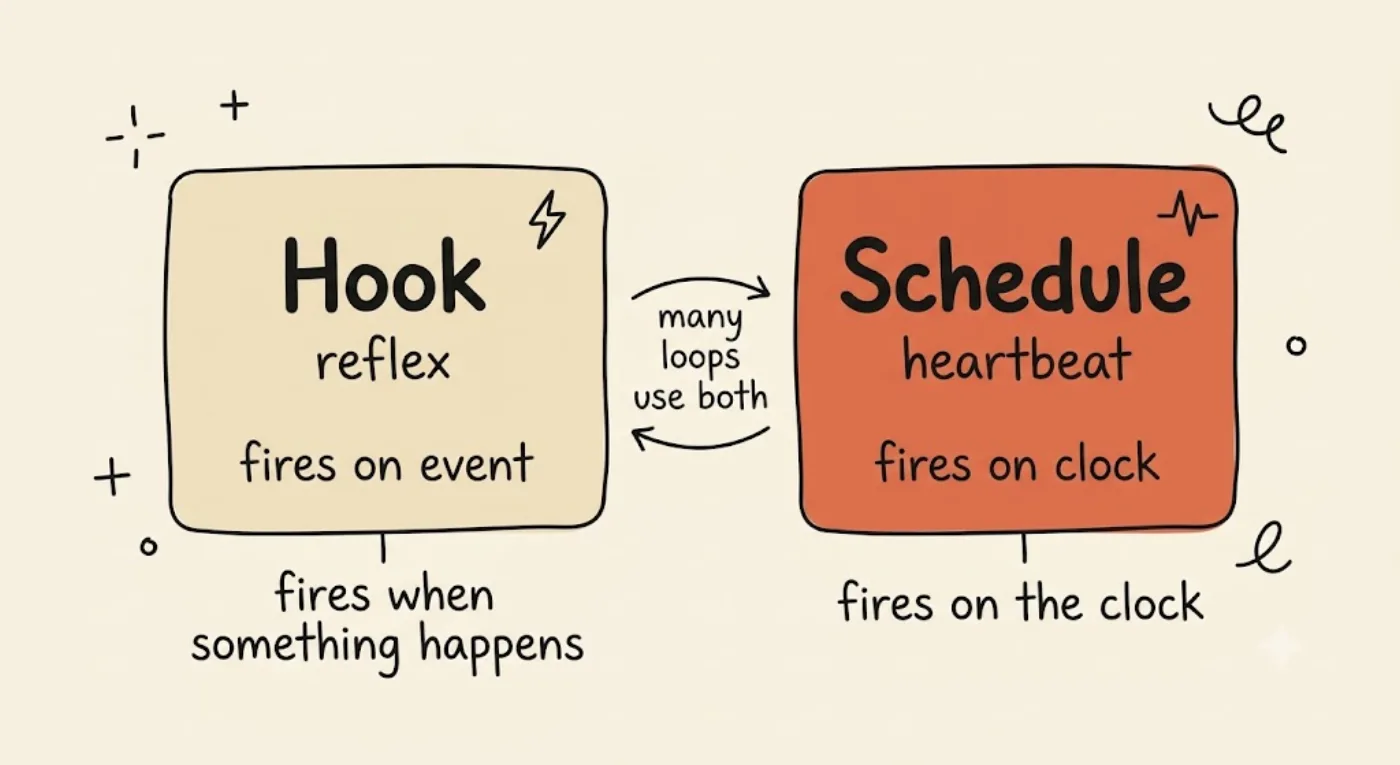
A hook is a reflex — it fires when something happens in a session. A schedule is a heartbeat — it fires on the clock whether or not anything did. If the beat only matters when something happens, it is a hook; if it must patrol on a cadence, it is a schedule.
| Trigger type | Fires when | Example | Hook or schedule |
|---|---|---|---|
| Lifecycle | Something happens in a session | A tool runs; a stop is attempted | Hook |
| Time | The clock ticks, regardless | 06:00 weekdays; every push | Schedule |
How does the triage inbox pattern keep a scheduled loop safe?
The triage inbox is the rule that makes an unattended loop safe: every run discovers work and routes its findings to a human inbox, a run that finds nothing archives itself cheaply, and a run never merges its own findings directly. Discovery is automated; the decision stays human. This is the article’s own synthesis, not a cited number, but it is the single most important discipline in the post.
Three rules, in order of how badly they bite if you skip them.
Findings go to an inbox, and a human decides. The loop is allowed to do the discovery and the boring parts: open lanes, draft PRs, write a findings list. It is not allowed to decide what lands. This is the same boundary Part 3 drew for stop conditions: a checker can enforce that the tests pass, but merge is a human call. The inbox is just the physical place that handoff happens, and it should be small and greppable: a state file, a GitHub issue, a PR draft, a Slack message.
Nothing found, archive the run. An empty run writes a one-line “nothing today” record and exits. That is itself a verifiable stop condition: the run reached a state a different process can confirm, and it stopped. It also has to be cheap, which is the whole of Beat 5, so hold that thought.
Never let findings go straight to merge. This is the cardinal sin of unattended automation, and it is exactly the failure mode Anthropic’s long-running-agent playbook warns about: premature victory, fake-done, a loop that declares success it did not earn. The anti-pattern reads seductively (“run it day and night until the feature is done, auto-merging as it goes”) and it is how you wake up to a main branch full of plausible-but-wrong commits. The inbox is the firewall.
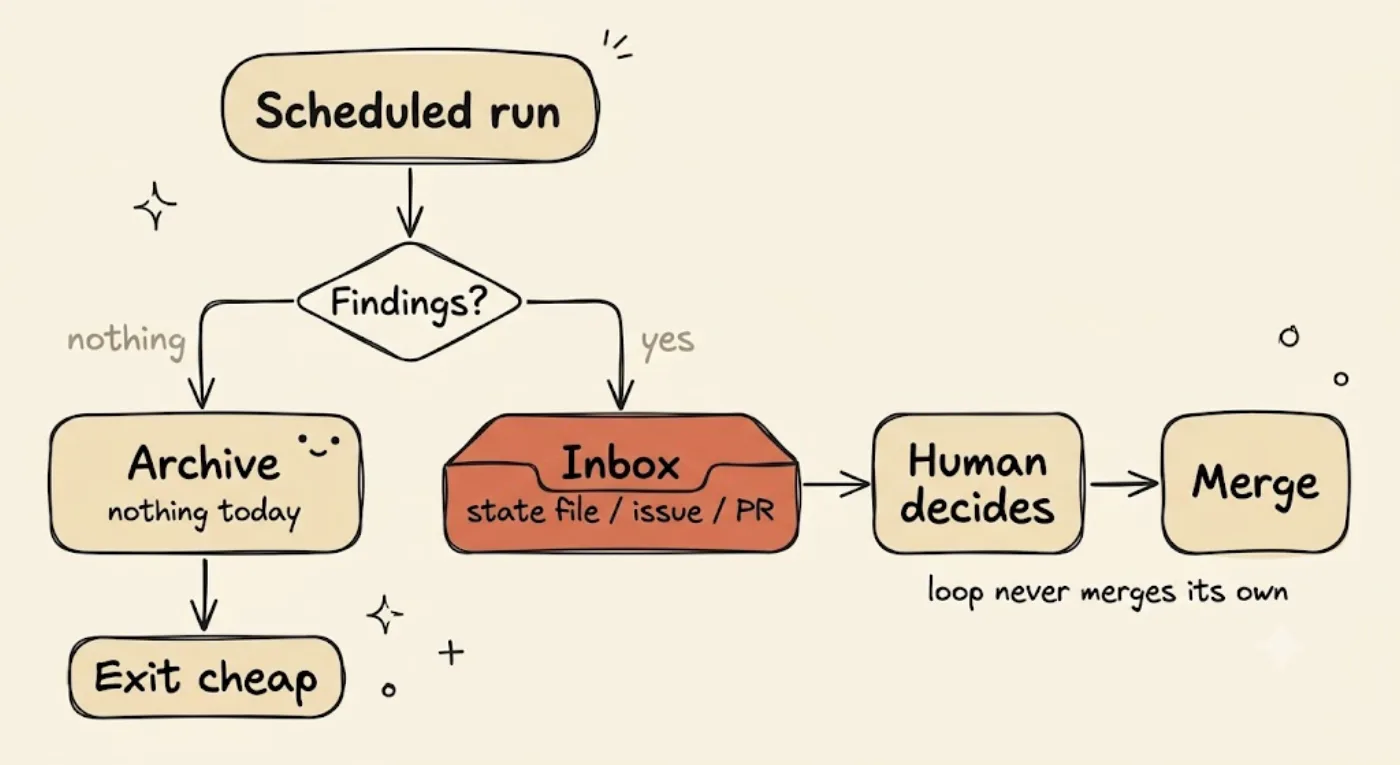
The triage inbox is the firewall that makes an unattended loop safe: findings route to a human inbox — a state file, an issue, a PR draft — and a person decides what merges; a run that finds nothing archives itself cheaply. The loop never merges its own findings.
scheduled run | |-- findings? --> inbox (state file / issue / PR) --> human decides --> merge | (the loop never merges its own findings) | '-- nothing? --> archive "nothing today" --> exit cheapHands-on: a scheduled agent automation loop for morning triage
A scheduled trigger woke a triage step, it read two real work sources (yesterday’s CI and an open-issues list), wrote every finding to one tried/passed/open/blocked state file, and opened worktree lanes for the top two findings while leaving the rest in the inbox. The passed section stayed empty, because the loop routes and never merges. Here is the run, honest about its limits first.
Read the honesty note before the code. This is a mechanism proof, not a live overnight cloud-Routine or a cloud-executed GitHub Actions run. Neither is cleanly capturable headlessly, the same limit documented in the Part 3, 4, and 5 traces. The Actions workflow file below is shown, not cloud-run; the cron line is the real artifact you would install, but the sandbox has no cron daemon, so the schedule itself was not fired by cron. Instead the exact triage step the cron line invokes was run directly, which is what the heartbeat executes either way. The decision-maker is deterministic ranking logic, not an LLM agent turn, so nothing was instrumented and there is no token or cost figure to report. Do not read one into it.
The two work sources. The morning loop reads two things. The first is yesterday’s CI: a real pytest suite with two genuine, independent failures (a slugify that leaves a trailing hyphen, and a load_port that returns a string instead of an int). The second is an open-issues list with three items: #14 and #15 describe those same two defects, and #19 is a feature request with no failing test. The decision-maker de-dupes a CI failure against the issue that represents it (so #14 and #15 are not double-counted), ranks CI-red bugs above issue-only items and bugs above features, and selects the top two for lanes.
Step 0, yesterday’s CI (expect 2 RED). Before any triage, a real run confirms two findings are red:
$ python3 -m pytest -qtests/test_config.py:3: AssertionError_____________________________ test_trailing_hyphen _____________________________
    def test_trailing_hyphen():>       assert slugify("Hello World!") == "hello-world"E       AssertionError: assert 'hello-world-' == 'hello-world'EE         - hello-worldE         + hello-world-E         ?            +
tests/test_slugify.py:3: AssertionError=========================== short test summary info ============================FAILED tests/test_config.py::test_port_is_int - AssertionError: assert '8080'...FAILED tests/test_slugify.py::test_trailing_hyphen - AssertionError: assert '...2 failed in 0.01sPYTEST_EXIT=1
Schedule trigger A, a committed GitHub Actions workflow. This is the CI heartbeat (Beat 1) as a real, committed file. It is shown for reproduction, not executed in the cloud here:
name: morning-triageon: schedule: - cron: "0 6 * * 1-5" # 06:00 on weekdays, the heartbeat workflow_dispatch: {}jobs: triage: runs-on: ubuntu-latest steps: - uses: actions/checkout@v4 - name: Run morning triage (discover, write inbox, open lanes) run: python3 triage/triage.py --budget-runs 1 --max-lanes 2Schedule trigger B, a real 5-field local cron line. This is the entry you would install with crontab -e:
0 6 * * 1-5 cd /home/you/p6-triage && /usr/bin/python3 triage/triage.py --max-lanes 2 --budget-runs 1 >> $HOME/.morning-triage.log 2>&1Triage, the decision-maker in the body. Running the exact step cron invokes: it reads both sources, ranks, opens two worktree lanes for the top two, and leaves the third finding in the inbox. --max-lanes 2 and --budget-runs 1 are the kill switches from Beat 5 (cap lanes per run, cap runs per invocation):
$ python3 triage/triage.py --max-lanes 2 --budget-runs 1TRIAGE: 3 findings; opened 2 lanes; 1 left in inbox; passed=0 (never auto-merge)
$ git worktree list/home/you/p6-triage  242b6dc [master]/home/you/wt-finding-14  242b6dc [triage/finding-14]/home/you/wt-finding-15  242b6dc [triage/finding-15]
The inbox, one state file. The findings land in a single LOOP_STATE.md reusing the Part 4 tried/passed/open/blocked schema. The lanes opened reuse the Part 5 worktree mechanism:
# Loop State: morning triage (Part 4 schema)
## tried- read CI: 2 failing test(s); read issues: 3 open- opened 2 worktree lane(s) for the top 2 finding(s)
## passed- (none; triage never merges; a human decides what ships)
## open- [#14 CI-red: tests/test_slugify.py::test_trailing_hyphen] lane opened: /home/you/wt-finding-14 on triage/finding-14 (awaiting human)- [#15 CI-red: tests/test_config.py::test_port_is_int] lane opened: /home/you/wt-finding-15 on triage/finding-15 (awaiting human)- [#19 [feature] add a --version flag to the CLI] in inbox, no lane (below top-2)
## blocked
The headline of the whole run is one line of that file: ## passed is empty. The loop discovered work, wrote it to the inbox, and opened lanes for a human to take. It merged nothing.
The empty run, archive cheaply. Fix both bugs, clear the issues list, and re-run to simulate a clean morning. The triage step does the minimum read and exits:
$ python3 -m pytest -q..                                                                       [100%]2 passed in 0.00s
$ python3 triage/triage.py --max-lanes 2 --budget-runs 1EMPTY RUN: 0 findings -> archived 'nothing today', exit cheap
# Loop State: morning triage (Part 4 schema)
## tried- [2026-06-15] read CI (0 failing) + issues (0 open) -> nothing to triage; archived
## passed
## open
## blockedReap the lanes. Cleanup removes both lanes so the heartbeat does not accumulate orphan worktrees across runs:
$ git worktree remove ../wt-finding-14$ git worktree remove ../wt-finding-15$ git worktree list/home/you/p6-triage 0bea45a [master]That is the full morning loop. A schedule woke it, it read two real sources, it wrote findings to one state file without merging anything, it opened lanes for the top two, and a clean re-run archived itself for nearly nothing.
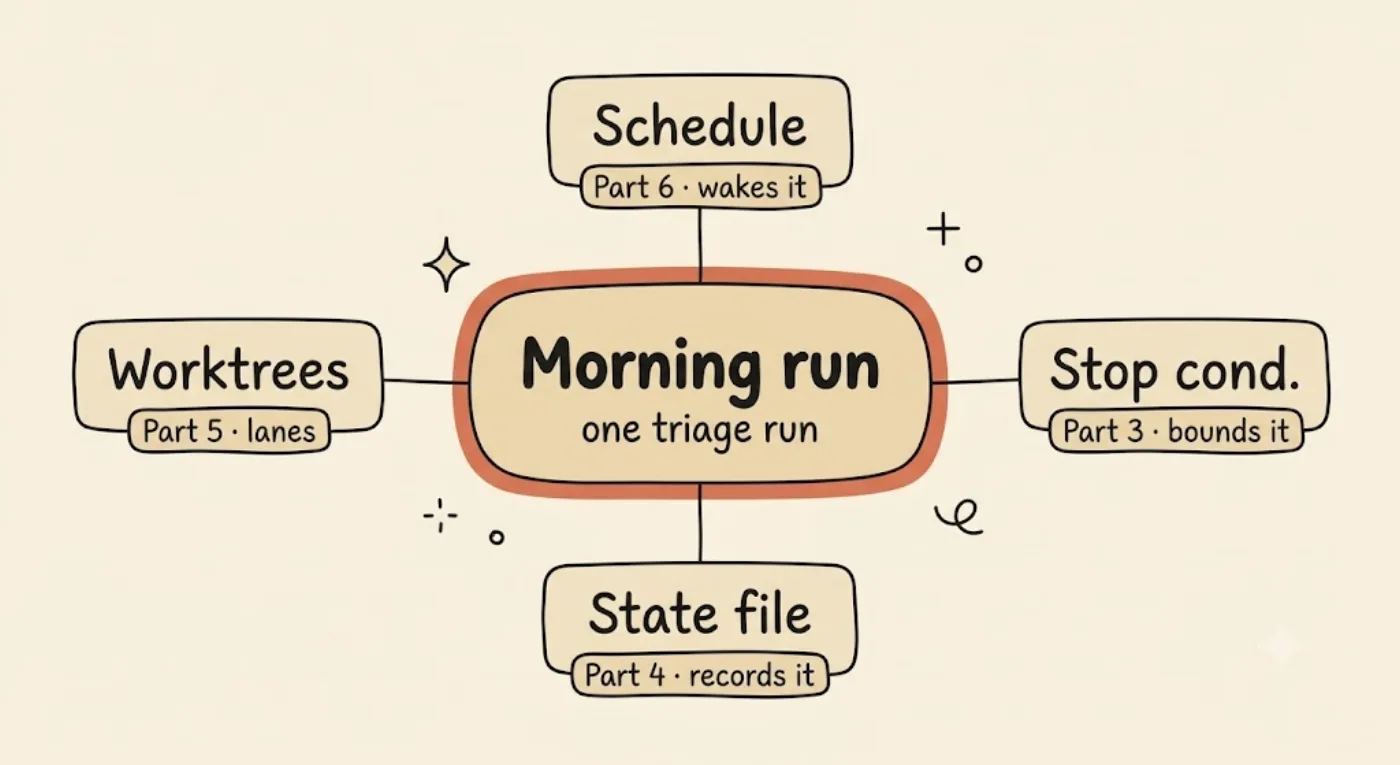
The scheduled morning-triage loop is the whole series in one run — a schedule wakes it (Part 6), a stop condition bounds it (Part 3), findings land in the state file (Part 4), and the top two get worktree lanes (Part 5). The cadence is the only new part.
What does it cost to run on a cadence, and how do you keep empty runs cheap?
A daily cadence multiplies cost by frequency, so the bound that matters is per-run: a budget cap and kill switches on every run, and an empty run that exits near-free. If a run that finds nothing still costs real money, a daily schedule is a slow leak you will not notice until the invoice.
General session cost discipline lives in the cost-optimization guide; link it. Part 6 covers only what’s unique to unattended cadence: a per-run budget cap, kill switches, and why an empty scheduled run must be near-free. Do not recycle the 15-message rule or context-bloat strategies here; that is the other post’s job.
Three things are specific to running on a schedule. First, per-run budget and kill switches. continuous-claude exposes the kill-switch surface for an unattended loop directly: --max-runs, --max-cost, --max-duration, --stall-threshold, and the claude-code-action runaway-loop guardrails are the same idea in CI. A scheduled loop without these is the thing that burns a month of budget overnight while nobody is watching.
Second, empty runs must be cheap. The triage inbox’s “nothing, archive” path from Beat 3 is also the cost path. On a daily cadence the empty run is the common case, not the exception, because most mornings there is nothing red. nightcrawler’s per-run episode budget is the same instinct: bound what a single run can spend before it starts. Third, the cadence-cost trade. A more frequent heartbeat means faster discovery and more empty runs to pay for. Tune the frequency to how often work actually appears, not to how often you wish you were looking.
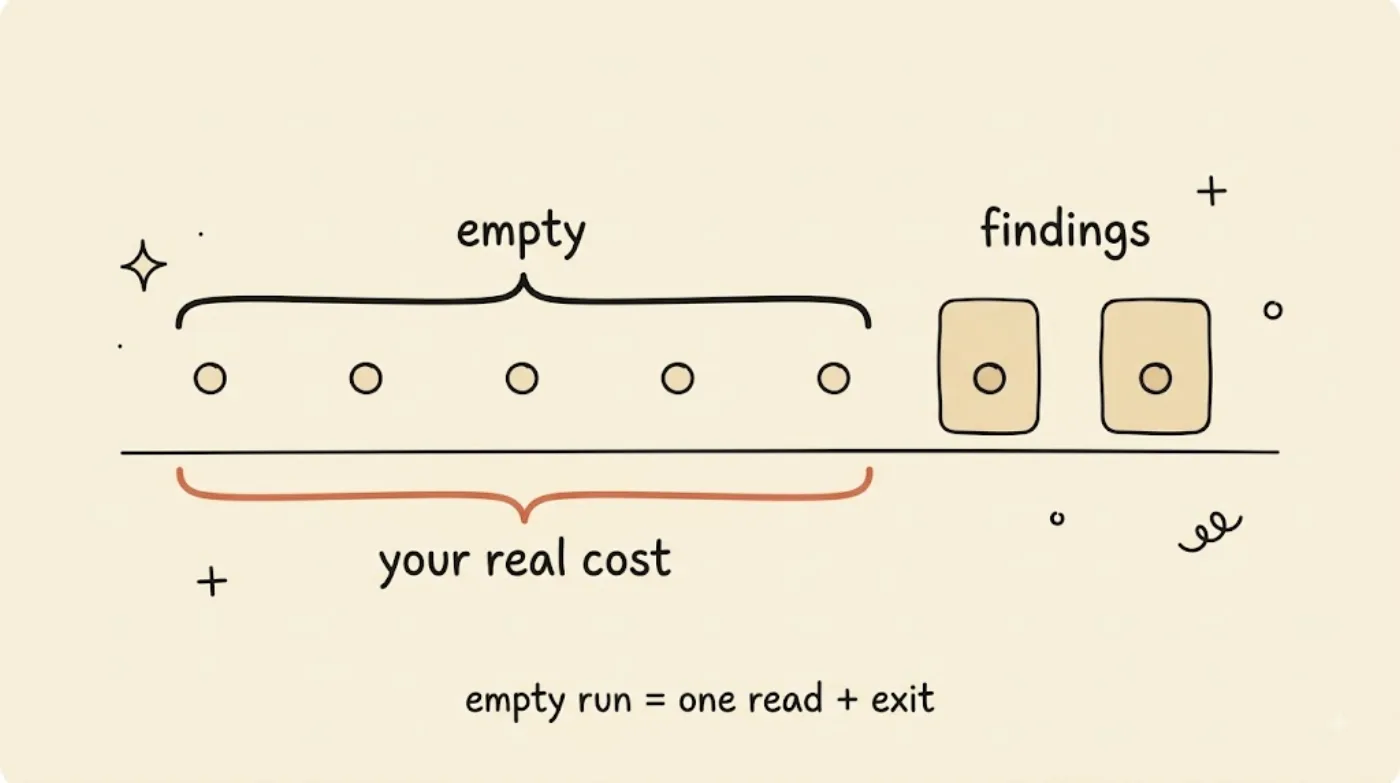
On a daily cadence most mornings are quiet, so the empty run is the common case — and therefore your real cost. Bound every run with kill switches and make “nothing today” a minimum read plus an exit, or the heartbeat drains the budget while you sleep.
| Kill switch | What it bounds | Failure it prevents |
|---|---|---|
--max-runs | Iterations per invocation | An infinite re-run loop |
--max-cost | Dollars per run | A runaway bill overnight |
--max-duration | Wall-clock per run | A hung run that never exits |
--stall-threshold | Iterations with no progress | Spinning without converging |
The one-line rule under that table: an empty run is a minimum read plus an exit. Anything more and the common case is the expensive case.
What you have, and what is next
You now have the cadence layer: the three heartbeats (in-session /loop, cloud Routines, CI) and a fit rule for each, the hook-vs-schedule decision (reflex versus heartbeat), the triage-inbox discipline (route to a human, never auto-merge, archive cheaply), a complete scheduled morning-triage loop wired to a real work source, a state file, and worktree lanes, and a per-run budget with kill switches so the empty run stays near-free.
Four things to watch in production: a schedule with no decision-maker in the body (that is just cron); a loop that auto-merges its own findings (the cardinal sin); an empty run that is not actually cheap (a daily leak); and a cadence faster than work appears (paying for empty runs). A heartbeat without a triage inbox is just an unattended agent merging slop at 3am, so hold every run to a verifiable stop and keep merge a human call.
You now have every piece: blocks, stops, memory, fleet, and a heartbeat. What is left is the honest part. Next is the journey log of retrofitting all of this onto a real, messy first loop, loop-journey-retrofitting-first-loop, the start of the practice phase.
FAQ
Is a scheduled agent loop just a cron job?
No. A cron job runs a fixed script; a scheduled loop runs a decision-maker in the body. The schedule is the trivial half. What makes it a loop is that each run reads state, decides what to do, and updates that state, so the next run continues where this one stopped instead of repeating a static command.
Should I run my loop with cron, cloud Routines, or CI?
Pick by where the work lives and who needs to be awake. In-session /loop is for attended sweeps while you’re at the keyboard. Cloud Routines run on a 5-field cron with your laptop closed (per-plan daily caps), so they’re the true overnight cadence. CI (GitHub Actions) is best when the work is the repo and your team already lives in CI.
When should I use a hook instead of a schedule?
Use a hook when the beat must react to something that just happened in a session (a tool ran, a stop was attempted); hooks are reflexes. Use a schedule when the beat must patrol on a cadence whether or not anything happened; schedules are the heartbeat. Many loops use both: a schedule wakes the loop, hooks govern each turn inside it.
How do I stop a scheduled loop from merging bad code on its own?
Use the triage-inbox pattern: the loop discovers work and routes findings to a human (a state file, an issue, a PR draft), but a person decides what merges. A run that finds nothing archives itself. The loop is never allowed to merge its own findings directly, so discovery is automated and the decision stays human.
How do I keep a daily scheduled loop from burning my budget?
Bound every run, not just the whole job: set a per-run budget and kill switches (--max-cost, --max-duration, --max-runs, --stall-threshold), and make the empty run cheap so a “nothing today” run does the minimum read and exits. On a daily cadence the empty run is the common case, so its cost is your real cost.
What to Read Next
- The five building blocks: the blocks this post schedules; read it if Beat 1 assumed too much.
- Stop conditions and verification: why an empty run is a real stop and why merge stays human.
- The state file pattern: the tried/passed/open/blocked file the triage step writes into.
- Git worktrees for agents: the worktree lanes the morning loop opens for the top two findings.


